Here’s a question I don’t hear designers ask often enough: what does it actually cost you not to know AutoCAD?
Not the vague, uncomfortable feeling that you should probably learn it someday. The actual dollar amount. The hours you spend on workarounds, the drafter you pay to produce drawings you can’t do yourself, the projects you can’t quote for because your technical skills aren’t there yet.
I know what that gap looks like, because I’ve been on both sides of it.
Where I started
Early in my career, I was a beginner. Not just in AutoCAD…in all of it. The software, the systems, the way a professional studio actually runs. I was figuring it out as I went, like most people do.
What I noticed pretty quickly was that the designers who struggled (the ones who couldn’t work efficiently, who ignored studio standards, who produced drawings that needed constant correction) were the ones who stayed stuck. Some of them were eventually let go. Not because they weren’t creative or talented, but because they were a cost rather than an asset.
So I made a decision. I was going to get good at the technical side. Really good. I worked on my AutoCAD skills, learned to work efficiently, and followed studio standards carefully, organized file structures, clean layer setups, drawings that other people could actually pick up and use without having to decipher them first.
And something shifted. I started getting put on more interesting projects. I got raises and bonuses. I became someone the studio wanted to invest in, because I was making their work easier and their projects more profitable. The technical skills weren’t separate from the creative work. They were what made the creative work possible at a professional level.
The ones who invested in getting genuinely good at the tools were the ones who got noticed, got promoted, and got paid more.
That experience is a big part of why I teach AutoCAD the way I do now. The skill is worth real money. I’ve seen it in my own career, and I’ve seen it in the careers of hundreds of students since.
The financial case for learning AutoCAD
The conversation around learning software more formally almost always focuses on the cost of learning it. The course fee, the time, the learning curve. What it rarely looks at is the other side of that equation.
Learning AutoCAD isn’t an expense. For most designers, it’s one of the best financial decisions they’ll make in their practice.
Let me show you why, and let you run the numbers for yourself.
How AutoCAD efficiency actually makes you more money
This is where it’s worth pausing, because the financial benefit works differently depending on how you structure your fees. And it’s easy to misread it.
A lot of interior designers don’t bill purely by the hour for every task. More commonly, you quote a design fee for a project. That fee is built on an internal estimate: roughly how many hours the project will take, multiplied by your or your team’s notional hourly rate(s). Let’s say that rate is $150 an hour.
When you work more efficiently in AutoCAD, you don’t reduce that fee. The project scope hasn’t changed. The client is paying for the outcome (the design, the drawings, the service) not for a minute-by-minute log of your time. What changes is how many of your hours it takes to deliver that outcome.
Save five hours on a project at a $150 notional rate, and you’ve added $750 to the effective profitability of that project. The client pays the same. You’ve just recovered time that was previously being absorbed by slow, inefficient drawing work. Across ten projects a year, that’s $7,500 in recovered value, without raising your fees, taking on more clients, or working longer hours.
That recovered time also has a second use: taking on additional work. Hours freed up by efficiency don’t have to sit idle. They can go toward the next project, a new client, or simply finishing current work without the weekend catch-up sessions.
The three ways AutoCAD pays you back
When I look at the full financial picture of learning AutoCAD, it comes down to three things: profitability you recover on existing projects, money you stop spending on outsourced work, and work you can take on that wasn’t possible before.
1. Your projects become more profitable
As covered above, efficiency directly improves your margin on every project. You’re not working faster to charge less. You’re working faster to make the same fee go further, and to protect your time for the work that actually moves your business forward.
Faster isn’t just more efficient. It’s more profitable.
There’s another dimension here that doesn’t get talked about enough: deadlines. Meeting project deadlines consistently is a huge part of professional reputation. Clients remember when things run late, and they remember when they don’t. A designer who works efficiently in AutoCAD is far less likely to find themselves behind on drawings, scrambling on revisions, or delivering late because a floor plan took three times as long as it should have. That reliability has real value, even if it doesn’t show up directly on a balance sheet. (Not to mention saving yourself from staying up all night desperate to fix drawings to meet a deadline).
2. Outsourcing is expensive
Many designers who aren’t confident in CAD end up paying a design assistant or CAD technician to produce drawings they can’t do themselves. That cost varies, but it’s rarely small, and unlike most business expenses, it’s one you can eliminate entirely by closing the skill gap.
If you’re spending $2,000 to $4,000 a year on outsourced drawing work, that’s not a fixed cost of doing business. It’s a skill gap with a price tag.
3. Some work requires it
Commercial projects, design-build collaborations, larger residential work, anything contractor-facing. AutoCAD is a baseline expectation in a lot of those contexts. Designers who can’t produce clean, accurate technical drawings are quietly excluded from certain project types and client relationships. Learning the skill opens doors that stay closed otherwise.
Run the numbers for your own practice
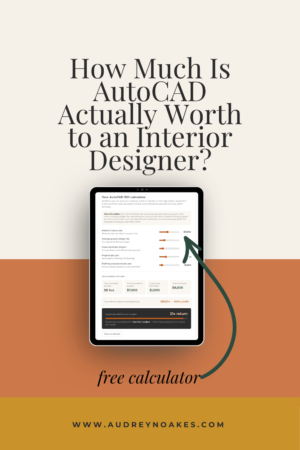
Every designer’s situation is different, your average project fee, how many projects you take on each year, whether you’re currently outsourcing drawing work. Rather than a hypothetical example, here’s a calculator you can adjust for your actual numbers. If you run a studio with a team, the sliders work just as well when you’re thinking about a design assistant’s output rather than your own.
Your AutoCAD ROI calculator
Whether you run your own practice, work in a studio, or manage a team, adjust the sliders to match your situation and see what confident AutoCAD skills are worth annually.
How this works: Your notional hourly rate is what you use internally to cost your time when building a project fee, not necessarily what you bill. When AutoCAD efficiency saves you hours on a project, your fee stays the same and those hours become pure profit. The calculator shows you what that's worth.
Most designers who run these numbers are surprised. They’ve been thinking about my course cost. They hadn’t been thinking about what’s sitting on the other side of that investment.
If you work in a studio, the math works in your favor too
Everything above applies if you run your own practice. But if you work for someone else, or you’re looking for your next role, the financial case for knowing AutoCAD is just as strong. It just shows up differently.
Studios hire for CAD competency. It’s often one of the first things screened for, and “I’ve used it a bit” lands very differently in an interview than “I’m fast and accurate in AutoCAD.” Confident technical skills don’t just get you through the door. They determine which doors are open to you in the first place.
Once you’re in a role, efficiency matters more than most designers realize. A studio’s profitability depends on how much billable work gets produced per hour of staff time. A designer who produces clean, accurate drawings quickly is genuinely more valuable than one who takes twice as long and needs more revisions. That’s not abstract. It shows up in who gets the interesting projects, who gets promoted, and who has the stronger case when asking for a raise.
I saw this play out firsthand early in my career. The designers who struggled with the technical side, who couldn’t follow studio standards or produce drawings other people could work from, were the ones who stayed stuck or eventually were asked to move on. The ones who invested in getting genuinely good at the tools were the ones who got noticed, got promoted, and got paid more. It really is that direct a relationship.
The thing about software skills that’s different from other expenses
When you hire a design assistant or CAD technician, that cost recurs. Every project, every month, every year. When you learn a skill, you pay once.
AutoCAD skills don’t expire. They don’t renew. They don’t have a price increase in January. You learn it, and it works for you on every project, for every client, for the rest of your career. The return compounds year after year without any additional investment.
What about the learning curve?
I know the objection. Learning curve. Time investment. “I’ve tried to learn AutoCAD before and it didn’t stick.”
Here’s the thing: AutoCAD isn’t hard. Not when it’s taught the right way. The reason it feels overwhelming is that most resources teach it as a general-purpose tool, covering every command and use case across every industry. That’s not what you need. You need the parts that matter for interior design workflows (and that’s a much more manageable set of skills than the internet rabbit hole suggests).
You don’t need to be tech-savvy. You don’t need a technical background. You just need to be willing to learn. I’ve taught AutoCAD to hundreds of interior designers who came in as complete beginners, many of whom were convinced they “weren’t good with software.” They were wrong. They just hadn’t been taught in a way that made sense for how they actually work.
The bottom line
If you’re a working interior designer who currently avoids AutoCAD, outsources drawing work to a design assistant or CAD technician, or spends more hours than you’d like on technical tasks you’re not confident in, the financial case for learning is clear.
Learning AutoCAD pays for itself quickly. The recovered project profitability, the outsourcing costs you eliminate, the roles and project types that open up. It adds up fast, and then it keeps adding up for the rest of your career.
The question isn’t really whether it’s worth it. The question is how many projects you want to wait before you start seeing that return.